
Why AlchemyCV
When working on computer vision projects, I found myself writing the same preprocessing pipelines over and over — blur, enhance, filter, mask, detect edges. Each time, I'd tweak parameters in code, re-run the script, and visually inspect the output. It was slow.
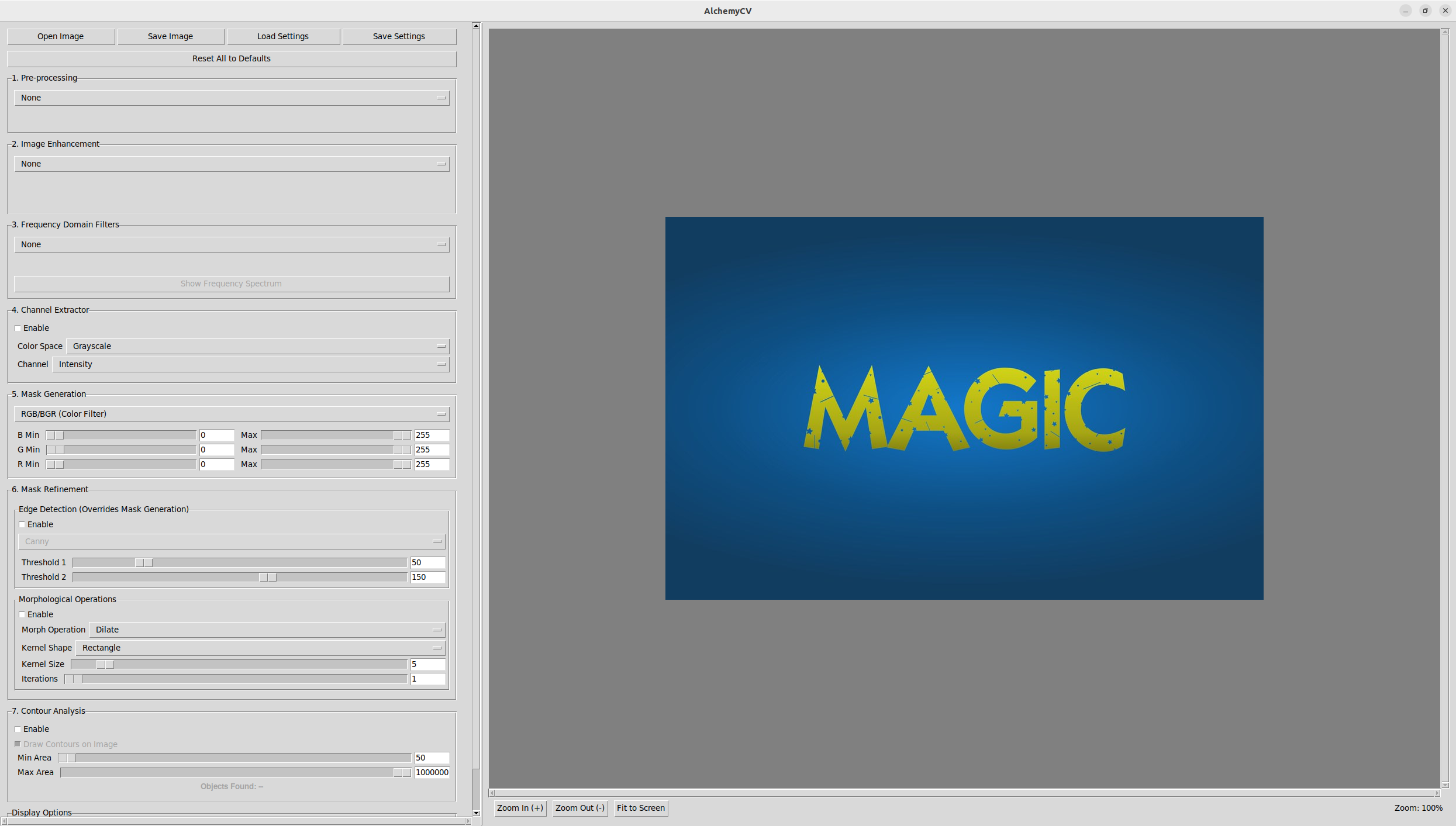
I wanted a tool where I could interactively adjust parameters in real time and see the effect immediately. That's AlchemyCV — a desktop application that chains five processing stages together with live preview.
The 5-Stage Pipeline
AlchemyCV processes images through five sequential stages. Each stage is optional — skip what you don't need:
- Pre-processing — Gaussian blur, median blur, bilateral filtering. Clean up noise before doing anything else.
- Enhancement — Histogram equalization and CLAHE (Contrast Limited Adaptive Histogram Equalization) for improving contrast.
- Frequency filtering — Fourier transforms with configurable low-pass and high-pass filters. Useful for removing periodic noise or isolating texture patterns.
- Masking — HSV and Lab color space filtering. Define color ranges interactively to isolate regions of interest.
- Refinement — Edge detection (Canny, Sobel, Prewitt) and contour analysis with automatic counting and area-based filtering.
Key Features
- Real-time parameter tuning — Every slider and dropdown updates the output instantly. No re-running scripts.
- Interactive zoom and pan — Inspect details at pixel level.
- Coordinate tracking — Status bar shows cursor position and pixel values.
- Session save/restore — Save your entire pipeline configuration as JSON. Load it later to reproduce exact results.
- Contour counting — Automatic detection with area-based filtering to ignore noise.
Installation
It's on PyPI, so getting started is one command:
pip install alchemycv
alchemycv
That's it. The GUI opens and you can load any image (JPG, PNG, BMP, TIFF, WEBP) and start processing.
When to Use It
AlchemyCV is most useful when you're:
- Exploring what preprocessing parameters work best for your CV pipeline
- Prototyping color-based segmentation (HSV/Lab masking)
- Counting objects using contour analysis and need to tune area thresholds
- Teaching or demonstrating image processing concepts interactively
It's not meant to replace OpenCV in production code — it's a workbench for figuring out what to build before you write the production code.
Technical Details
AlchemyCV is 100% Python, built on top of OpenCV for image processing and a lightweight GUI framework for the interface. The entire pipeline runs locally — no cloud, no API calls, no data leaving your machine.
The source is MIT-licensed and available on GitHub.