
I wanted to build an autonomous indoor/outdoor patrol robot that actually does something useful — not just walks around a room for a demo. The platform I picked was the Unitree Go2: rugged enough for outdoor patrol, stable enough for long runs, and small enough to fit through doorways.
The result is a surveillance quadruped. It wakes up, drops into walk mode, patrols a pre-mapped area on a random-walk policy, detects people it encounters, runs face recognition against a known-persons database, and if it sees someone who isn't on the list, it raises an intrusion alert. It also takes Bluetooth voice commands, so an operator can interrupt the patrol with a spoken instruction from across the room.
This post focuses on the surveillance-specific pieces: the random-walk patrol policy, the person-detection and face-recognition pipeline, the intrusion alert path, and the Bluetooth voice-command override.
The stack
The robot runs entirely on its onboard compute module — no backpack laptop, no tethered machine. The software breaks down into a few layers:
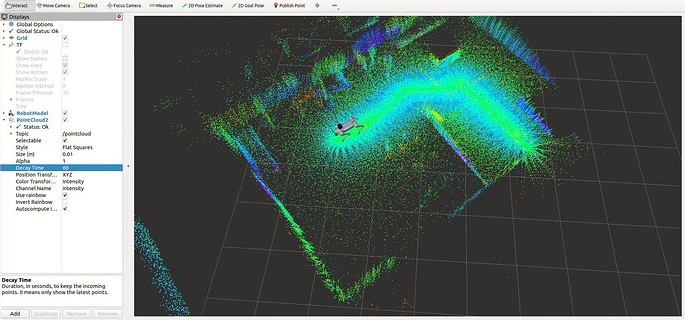
- Localization — LiDAR-Inertial odometry paired with a global ICP-based corrector against a pre-built point-cloud map, giving continuous drift-free pose in the map frame.
- Navigation — move_base with a DWA local planner, fed by live costmaps built from the registered LiDAR scans.
- Low-level control — a small bridge layer between the nav stack's velocity commands and the Go2's SDK, applying deadband and clamp for safety.
- Executor — a single long-lived Python process that owns the SDK clients, the backend link, and the application loop (patrol → detect → verify → alert).
- Vision — a dedicated controller juggling the RGB stream and the detection/recognition pipeline.
- Audio in — a Bluetooth microphone pipeline for operator voice commands.
All of it runs onboard. The only thing the wifi link carries is alert payloads out and operator commands in.
Working with the Go2
A few things about the Go2 shaped the design:
- Gait stability. The Go2 is basically a trot machine — it accepts velocity commands across a wide range and doesn't get visibly unstable at the edges. That means the velocity bridge layer can stay simple.
- Camera height. The Go2's camera sits low — roughly knee height. Face recognition requires the robot to actually walk close to a person, because a standing person's face is well above the camera's natural line of sight at any distance.
- Battery and runtime. Walking a quadruped is cheap. That matters when the use case is "patrol this area for an hour unattended."
- No arms. Which simplifies everything — no manipulation, no pick-and-place, no arm-reach safety concerns. Navigation, perception, and audio only.
Random-walk navigation in a mapped area
The patrol doesn't follow a fixed route. Fixed routes are predictable, and predictable surveillance is easy to slip past — you just wait for the robot to walk past, then move. Instead, the patrol picks random goals within the pre-mapped area and lets move_base plan paths to them.
The random-walk policy is deliberately simple:
- Load the pre-built occupancy grid and point cloud for the patrol area (standard 2D costmap + 3D point cloud)
- Sample a random 2D point uniformly from the navigable region of the costmap (reject samples that fall on obstacles or inside the inflation zone)
- Send the point to move_base as a goal and wait for success, abort, or timeout
- On success: pause briefly to let the vision pipeline scan the area, then loop
- On abort: pick a new random goal and try again
It's not fancy, but the emergent behaviour looks surprisingly coherent — the robot covers most of the area within a few minutes, lingers briefly at each stop, and never revisits the same spot in a predictable rhythm.
Person detection and face recognition
The vision pipeline runs on the Go2's onboard compute and has two stages:
- Person detection — a lightweight object detector (Detectron2 with a person-only class head) that runs on the live RGB stream. This is the cheap stage; it triggers everything else.
- Face recognition — when a person detection fires, the controller crops the upper portion of the bounding box, runs a face embedding model over it, and compares the resulting vector against the known-persons database using cosine similarity. A match above a tuned threshold counts as "known"; anything below counts as "unknown".
The known-persons database is just a directory of labelled face images that gets pre-computed into embeddings once, then loaded into memory at startup. Adding a new person to the allow-list is as simple as dropping a new image into the directory and re-running the embedding step. There's no web UI for managing the DB — intentionally, because the DB lives on the robot and isn't exposed to the network.
Intrusion detection in the mapped / PCD area
Putting the pieces together, intrusion detection looks like this:
- The Go2 patrols the pre-mapped area using the random-walk policy above
- At every stop — and continuously while walking — the person detector scans the RGB stream
- When a person is detected inside the mapped patrol region, the face-recognition stage fires
- The detected face embedding is matched against the known-persons DB
- If the face matches someone in the DB, the robot logs the encounter (timestamp, location in the map frame, similarity score) and moves on
- If the face does not match — or if a person is detected but no face is clearly visible — the robot flags it as a potential intrusion and sends an alert
An alert is a simple JSON payload sent over WebSocket to a backend endpoint: {timestamp, location, annotated_image_base64, match_score, status}. The backend persists it and optionally forwards it to a notification channel (email, chat, whatever the operator has configured).
Because every alert includes the robot's position in the map frame (from the onboard localization stack), the operator can see exactly where in the patrolled area the unknown person was spotted — not just "somewhere on the camera feed." That's the difference between "there might be an intruder" and "there's an intruder near the east entrance, here's the last known map position."
Bluetooth voice commands
The last piece is an operator override: a small Bluetooth microphone that pairs with the Go2 at startup and streams audio into a lightweight speech-to-text model running on the robot. A short list of hard-coded command phrases — things like "stop", "go home", "patrol", "stand down", "sit" — get matched against the transcript, and each one maps to an action in the same executor that runs the patrol loop.
It's deliberately a tiny vocabulary. General-purpose speech recognition on a mobile robot is a rabbit hole, and for a surveillance use case you don't need it — you need a handful of reliable overrides that work even when the operator isn't near a laptop. The Bluetooth link means the operator can issue those overrides from anywhere in range, not from a tethered console.
Why a quadruped for this?
You could do most of this with a fixed camera and a person detector — cheaper, simpler, no robot required. The reason to put it on a Go2 is coverage. A fixed camera sees one room. A patrolling quadruped sees the entire mapped area and can physically walk toward something suspicious for a closer look, from an angle the camera was never placed at.
It's also the kind of demo that makes sense to watch in person. A box on a wall running a neural net is not a conversation starter. A four-legged robot that walks around, notices you, checks your face against a list, and either ignores you or raises an alert — that's a conversation starter.
Closing
The hard parts of this project weren't the surveillance-specific pieces. The random-walk policy is a few dozen lines of Python. The face-recognition stage is mostly calling an off-the-shelf embedding model. The alert path is a JSON POST.
The hard parts are the same as every mobile-robot project: getting localization stable enough that "patrol this mapped area" is actually a well-defined command, getting the nav stack tuned so the robot doesn't pin itself into corners, and getting the vision pipeline to run at a rate the onboard compute can sustain while everything else is also running.
Once those are solved, a surveillance application on top is a relatively small layer — and the same foundation is reusable for anything else you might want a quadruped to do: inspection, delivery, environmental monitoring, or just showing up somewhere on a schedule. The order I'd recommend if you're building something similar is: localization first, then navigation, then perception, then the application. Skipping any of those out of order will cost you more time later than it saves now.